Friday, August 7, 2020

Illuminate to Google Classroom


Save time by connecting your Google Classroom to Illuminate. Since you are logging into Illuminate with your district Google account, this connection is made for you. Using this connection will save you a bunch of time by importing grades collected in Google Classroom to Illuminate. Take a look at the screenshots below to learn how.

The first step is to create an assignment, quiz or question in the Google Classroom Classwork tab.
The second step is to set up your assignment by adding points, due date and topic.

When you are ready to begin inputting grades, go to your Illuminate Gradebook. Select your class gradebook and click the Assignments tab. In the dropdown menu, select Import from Google Classroom.
After selecting Import from Google Classroom, the window below will appear. Once it processes, click Classroom and select the Google Classroom associated with the current gradebook.

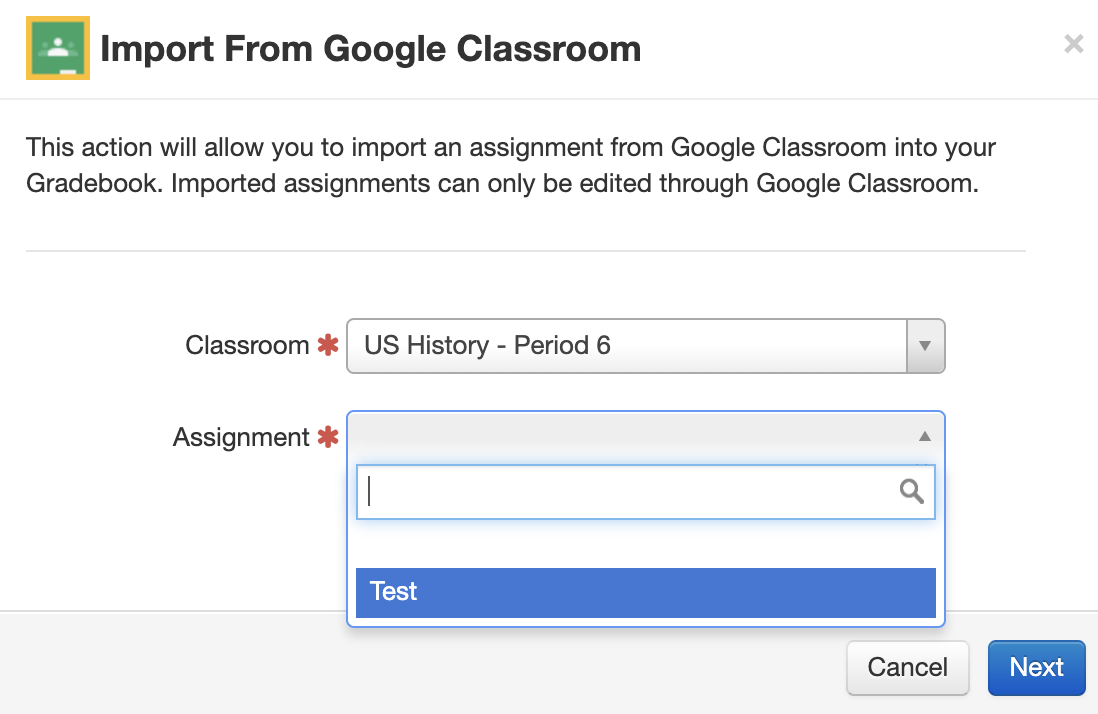
After selecting the correct Google Classroom, click Assignment. Upon clicking, a dropdown menu will appear displaying all of the assignments in that Google Classroom. Select the one you want to import to Illuminate.


In the window that appears, you'll see the details of the assignment you wish to import. Before importing, double check the details. If you find a mistake, go back to Google Classroom to edit the assignment. You are not able to edit a Google Classroom via Illuminate. 

Hopefully this is helpful. Please reach out to me via email and or Google Hangouts if you have any questions on the content of this blog post.


Sunday, August 2, 2020

Cardinal Innovation Center Sketchnotes Gallery Rewind: 9th Grade Scientific Method


This batch of sketchnotes from Mrs. Jobe's 9th grade science class from the 2018-19 school year. Her students sketchnoted each step of the scientific method. Students were encouraged to use a variety of strategies to organize the information with a combination of images, symbols, text, color coding, arrows and more. Click here to see all of these scientific method sketchnotes.

Friday, July 31, 2020

Cardinal Innovation Center Booksnaps Gallery Rewind: The Cold War


Booksnaps are one of my favorite way to have students mark the text, close read and identify textual evidence. On this page in the Cardinal Innovation Center Booksnaps Gallery, 10th grade World History students identified textual evidence of a variety of themes and concepts during the Cold War. The text that was used came from our World History textbook. Click here to view the booksnaps.

Thursday, July 30, 2020

Cardinal Innovation Center Memes Gallery Rewind: 9th Grade ELA - Of Mice and Men


After reading Of Mice and Men, Orosi High School 9th graders created memes to highlight some of the parts of the story they thought were most memorable. Using Google Slides and Google Classroom, the teacher was able to distribute a template and easily collect student-generated memes. Click here to see some student exemplar memes. 

Wednesday, July 29, 2020

Cardinal Innovation Center YouTube Gallery Rewind: AP Calculus Student Lessons


There is a saying that states if you can teach something to someone else, then you've learned it. Each year, Mrs. Ang at Orosi High School puts this idea into practice. Her AP Calculus students are required to record themselves teaching a key concept learned throughout the year in class. Click here to view some of her students' lessons from years past.

The Cardinal Innovation Center YouTube Gallery is designed to showcase student-created lessons, projects, how-to videos and more. Check here periodically to see the latest student-created videos from Orosi High School, Lovell High School and El Monte Middle School.

Friday, July 24, 2020

Cardinal Innovation Center Sketchnotes Gallery Rewind: Martin Luther King


In this section of the Cardinal Innovation Center Sketchnotes Gallery, 9th grade students from Orosi High School sketchnoted an article about the life and assassination of Martin Luther King Jr. Click here to see the sketchnotes.

Thursday, July 23, 2020

Introducing the Cardinal Innovation Center Memes Gallery


The Cardinal Innovation Center Memes Gallery is a curated collection of student-generated Memes across all subject areas and grade levels. It is designed to be a growing resource for students to refer to when reviewing learning as well as previewing new learning. 

This Gallery has been growing slowly over the past few years. Though not as "full" as the Cardinal Innovation Center Sketchnotes Gallery, it does have some clever student-generated insights. At this point, History/Social Studies classes have submitted the most memes while ELA is starting to grow a little bit. This coming school year, I look forward to filling this gallery with numerous memes across all content areas and 6-12 grade levels. 

Click here to browse the Cardinal Innovation Center Memes Gallery. If interesting in submitting your own memes, please use Google Slides to create and share with ajuarez@cojusd.org. Be sure to include the subject, topic and grade level.